Who's acting
The role, and the work it should not take on.
PersonaKit writes the boundary down as a contract you can read before the agent starts.
PersonaKit is a session-start layer between you and your coding agent. Before work begins it resolves a contract you can inspect, commit, and hand off.
in chatin the repo
The role, and the work it should not take on.
The capabilities authorized for this work mode.
The actions held off-limits for this session.
The review gates where the work pauses.
The problem is not that agents lack instructions. Capable agents, carrying memory and skills and compressed chat history, still need an operator-visible boundary for the work they are about to do.
You asked for a code review. The agent found something obvious and fixed it while it was there. You wanted findings; you got a diff.
With PersonaKit: the review session declares implementation forbidden, and that is visible before work starts. See the contract →
The first ten minutes go to explaining the rules: leave the CLI output alone, flag any public API change, stop before pushing. Next session, same rules, same typing. The work mode lived in chat, and chat ended.
With PersonaKit: the rules live in the repo, and the session starts with the contract already resolved. See the contract →
Someone else runs the agent against the same codebase. They never saw the careful review-only lane you set up. Nothing carries that boundary to them, and things happen that were not supposed to.
With PersonaKit: the contract is a committed file. Anyone can read it, run it, and hand off from the same starting boundary.
The agent has git, file editing, and bash. For this session, only file reading was appropriate. Nothing said so, and it did what it could rather than what you meant.
With PersonaKit: the contract declares what is authorized, not just what is available, so the agent knows the boundary before it starts. See the contract →
Availability is not authorization.
A tool being reachable does not mean it should run in this session. The contract decides.
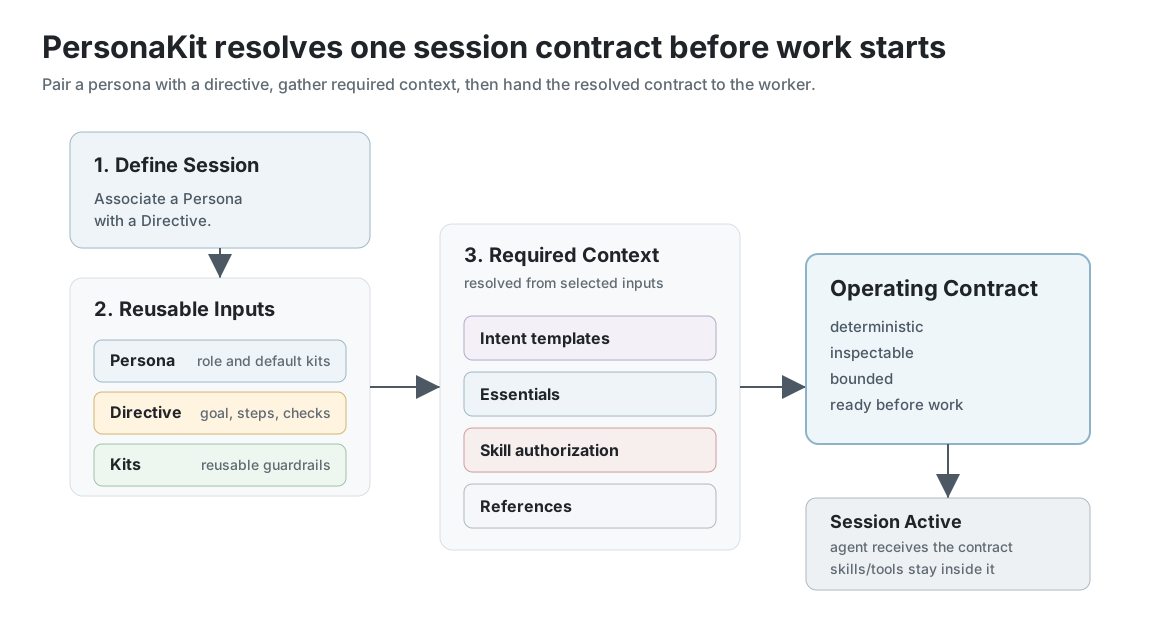
PersonaKit is the session-start resolver. Prompts describe the task, reusable PersonaKit content defines the pieces, and PersonaKit composes them into a resolved boundary for the handoff.
1. Start The Session
The operator asks for work and chooses the PersonaKit session that should govern it.
2. Resolve The Contract
Deterministically composes persona, directive, kits, skills, and skill authorization into one inspectable contract.
3. Work Under It
The person at the controls or the harness passes the exported contract into the coding agent or host surface. Skills and tools can help, but only when the contract authorizes them.
PersonaKit Studio sits on the same contract model as a visual inspection and pack-maintenance surface. The CLI and static example roots remain the primary path for validating, inspecting, and exporting contracts. Learn introduces the guided ReleaseDesk lab once the basic contract model is in place.
cd Site/public/examples/swift-cli-maintenance
personakit validate --root personakit-root
personakit contract --root personakit-root --session cli-maintenance
personakit export --root personakit-root --session cli-maintenanceThese commands assume a clone of the PersonaKit repo, where the example root lives under Site/public/examples. In your own project, point --root at your .personakit folder.
After the Start Here guide, use these roots as practical patterns for recurring work modes.
The happy path for bounded implementation with one authorized capability and clear stop points.
Open exampleHow MCP-aware agents should resolve PersonaKit context before choosing host-local tools.
Open exampleA read-only review contract that produces findings without becoming the implementer.
Open exampleA compact authoring contract for creating PersonaKit content with dry-runs, reuse, and validation.
Open exampleUse it at the start of a repeated session when a prompt plus skills is not enough: role, rules, allowed capabilities, stop points, and proof need to be inspectable before work begins.
Skip it when you only need a one-off prompt, a skill or tool inside an already-running conversation, a place to track tasks, or exploratory planning before the work mode is clear.